
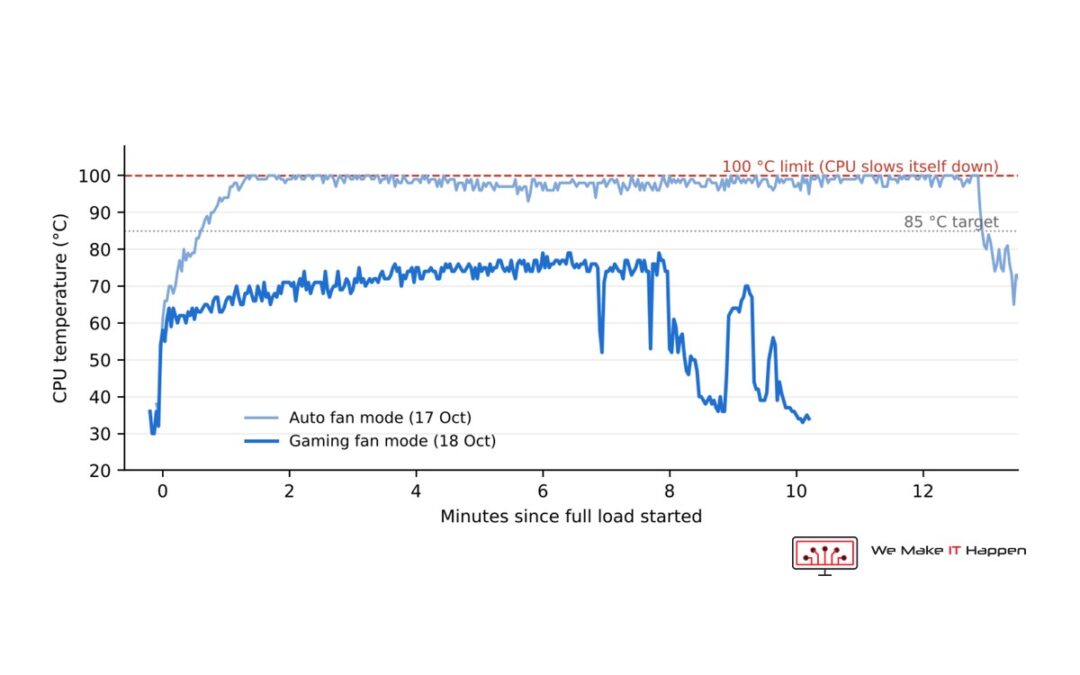
Forty seconds. That is how long this gaming PC took to go from 39 °C to 99 °C when we put it under load. Then it sat on its 100 °C limit and slowed itself down for the rest of the test. A gaming PC overheating like that is not broken yet, but it is giving away speed you paid for every time you play.
The PC was an Acer Predator Orion 3000 (PO3-640) with an Intel Core i7-12700F and an NVIDIA GeForce RTX 3070. Here is what the sensor logs showed, what we changed, and the twist: after the new hardware went in, it still overheated. The last fix was a setting.
The problem: 100 °C in 40 seconds
We do not guess at heat problems. We log every sensor with HWiNFO while the PC runs a stress test, then read the log. The first test loaded the processor and the memory, and it told a clear story:
- The processor reached 99 °C in about 40 seconds, then stayed at its 100 °C limit and throttled for the whole test.
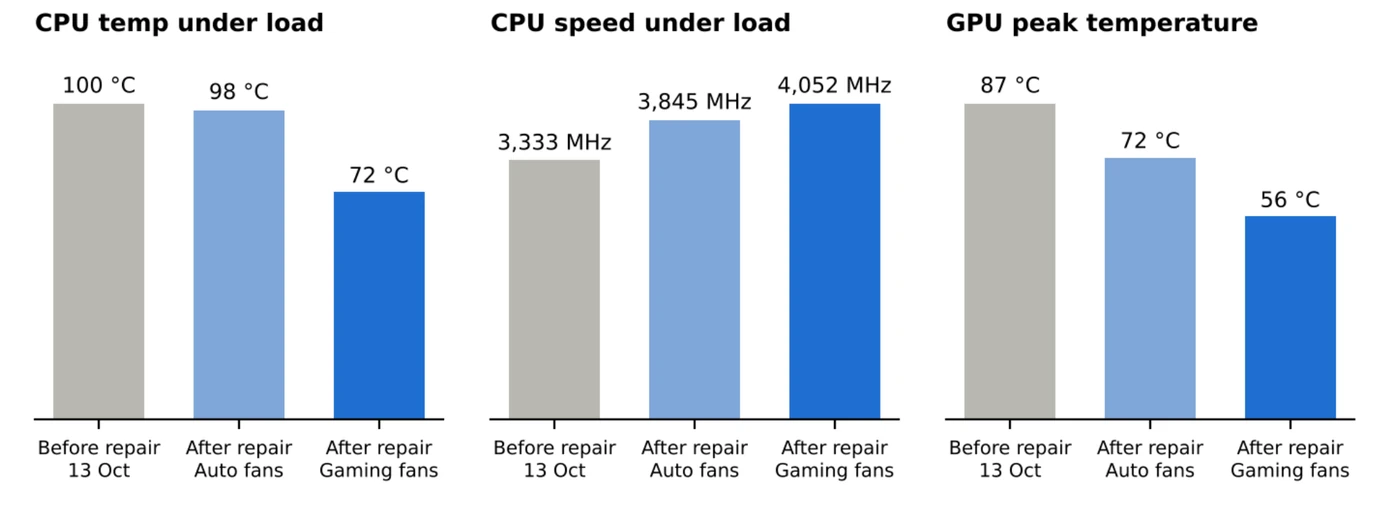
- To survive at 100 °C it cut its own power from 126 W to about 94 W, and its speed from about 4,000 MHz to 3,333 MHz on all cores.
- The processor fan barely reacted: between 1,040 and 1,352 RPM, even with the chip at 100 °C.
- The rest of the case was hot too: the graphics card peaked at 87 °C and the second SSD at 71 °C.
The good news was in the same log. The critical-temperature flags never triggered and no hardware errors were recorded. The processor was protecting itself exactly as Intel designed it to. Nothing was damaged.
The diagnosis: a small cooler, a big power limit and a lazy fan
Three things were working against this PC. First, dust: on the fans, in the heatsinks and through the case. Second, the cooler. Acer’s firmware lets this processor draw 126 W continuously, and the small stock cooler could not move that much heat. Third, the fan: at 100 °C a processor fan should be flat out, and this one was strolling.
Prebuilt gaming PCs often ship like this. A fast chip, a generous power limit and a cooler chosen for cost. It works on the day you buy it and gets worse with every month of dust.
The fix: deep clean, graphics card pads and a better cooler
- Full internal dust clean of the case, the fans and the heatsinks.
- Graphics card opened: the RTX 3070 was cleaned and its thermal pads were replaced.
- New processor cooler: the stock cooler came off and a better aftermarket CPU cooler went on, with fresh thermal paste.
- Retest with full logging. This time we loaded the processor and the graphics card together. That is a harder test than the first one, because the graphics card adds about 185 W of heat to the case.
The twist: it still hit 98 °C
The first retest was better, but not fixed. The processor now held its full 125 W instead of 94 W, so it ran about 15% faster, at 3,845 MHz. The graphics card was transformed: a 72 °C peak, with its fan never above 62%. And the PC cooled down faster afterwards, back to 43 °C five minutes after the load stopped.
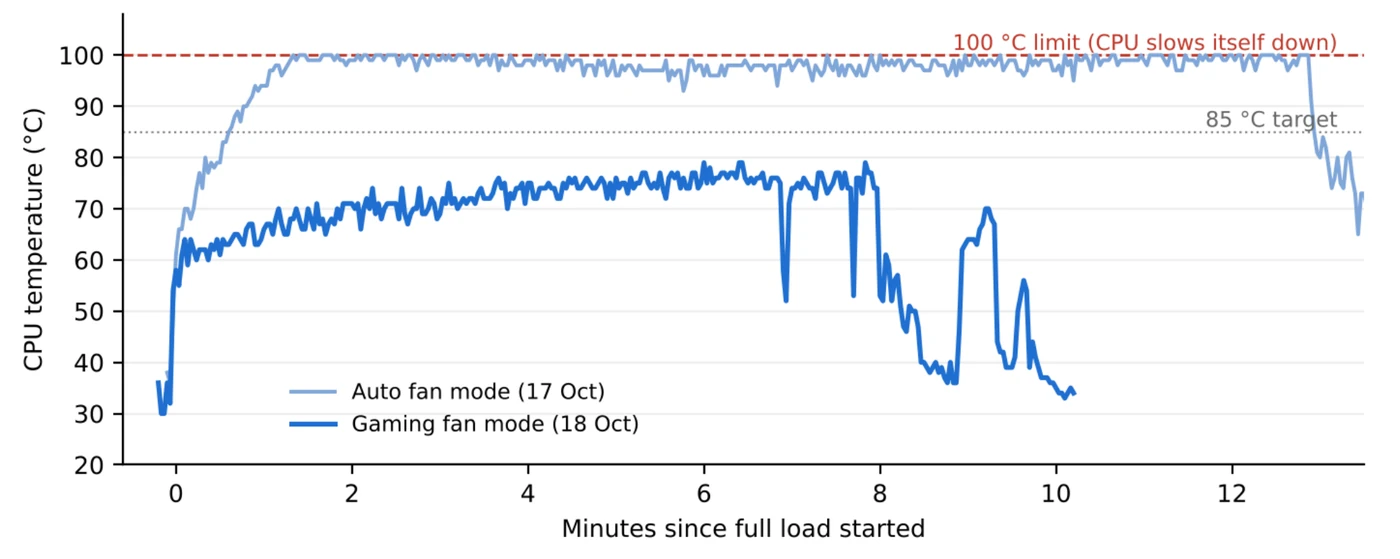
But the processor still climbed to between 97 and 100 °C, and it throttled for 98% of the steady load.
The log showed why, and it was not the new cooler. In the PC’s Auto fan mode, the processor fan sat at about 1,025 RPM until the chip was already at 94 °C, and it never went above 2,257 RPM. The cooler could do the job. The fan curve was not asking it to.
The result: 72 °C and no throttling
Acer’s PredatorSense app has a fan control page. We switched it from Auto to Gaming and ran the same test again.
- Processor: 72 °C on average under full load, 79 °C at its peak, with no thermal throttling at all.
- Speed: it held 125 W at 4,052 MHz on all cores, about 22% faster than before the service.
- Graphics card: a 56 °C peak (hot spot 68 °C) while drawing about 173 W on average.
- Processor fan: about 3,360 RPM from the start of the test.
- Hardware errors: none.
| Measure | Before | After, Auto fans | After, Gaming fans |
|---|---|---|---|
| Processor temperature, sustained load | about 100 °C (at its limit) | 98 °C | 72 °C average, 79 °C peak |
| Thermal throttling | most of the test | 98% of the test | none |
| Processor power held | 94 W | 125 W | 125 W |
| Processor speed, all cores | 3,333 MHz | 3,845 MHz | 4,052 MHz |
| Graphics card, peak | 87 °C | 72 °C | 56 °C |
| Processor fan under load | 1,352 RPM at most | 2,257 RPM at most | about 3,360 RPM |
One honest note on these figures. The test before the service loaded the processor and the memory only. Both tests after it loaded the processor and the graphics card together, which puts far more heat into the case. So the real improvement is bigger than the table makes it look.
Auto or Gaming: what the fans were really doing
These are the fan speeds PredatorSense itself reported in each mode:
| Fan mode | Front | Back | CPU | GPU |
|---|---|---|---|---|
| Auto (at rest) | 983 RPM | 1,004 RPM | 502 RPM | 1,097 RPM |
| Gaming | 3,325 RPM | 3,479 RPM | 1,956 RPM | 2,749 RPM |
Gaming mode has a price, and it is noise. The fans stay near full speed even when the PC is doing nothing. For browsing and office work, Auto is quieter and cool enough.
What this means for your gaming PC
- Check the fan mode before you buy parts. New hardware is not enough if the fan curve is lazy. Look in PredatorSense, or in the BIOS on other makes.
- Want quiet and cool together? Use a Custom curve. Let the fans start speeding up at about 60 °C and reach full speed by about 80 °C.
- Another option is a lower power limit. Setting the long-term limit to about 100 to 105 W should give roughly 85 °C for about 5% less speed. That is a rough estimate from these logs, not a promise.
- Clean the dust filters every 3 to 6 months, and keep the front and back vents clear.
- Do not panic at 100 °C, but do not ignore it. The processor will not be damaged in an instant, because it slows itself down first. You pay for that in frame rate, every session.
Frequently asked questions
Why does my gaming PC hit 100 °C?
Usually a mix of dust, a cooler that is too small for the processor’s power limit, and a fan curve that speeds up too late. On this Acer Predator Orion 3000 all three were at work, and the fan curve turned out to be the last piece.
Is 100 °C dangerous for a processor?
Not instantly. At its limit the processor protects itself by cutting its power and speed, which is called thermal throttling. It costs performance for as long as it lasts, so it is worth fixing.
Will a new CPU cooler fix an overheating gaming PC on its own?
Not always. On this PC the new cooler raised the power the processor could hold, but the temperature only came down once the fans were set to react earlier. Test again after any hardware change.
Is PredatorSense Gaming mode safe to leave on?
Yes. It only runs the fans faster, so the PC is louder. If the noise bothers you at the desktop, use Auto for light work or set a Custom curve.
Gaming PC running hot? Cambridge and Dagenham, by appointment
We test first, with every sensor logged, so you see the numbers before and after. See our deep cleaning and thermal paste replacement page, book an appointment, or message us on WhatsApp 0749 792 5760.
More from the same bench: an ASUS ROG Strix that switched off in games, and what we found inside an overheating Acer Predator Helios 300.